
Amleto. A Lightwave 3d Network rendering controller
Note: Lightwave 2018 is not supported.
Amleto development has been stopped
As it’s been several years since i’ve used Lightwave on a regular basis I have halted work on Amleto and have moved on to other personal projects
While I won’t be updating it to support Lightwave 2018, the latest version of the code can be found on GitHub. If somebody was interested in adding Lightwave 2018 support I would be willing to help out where I can.
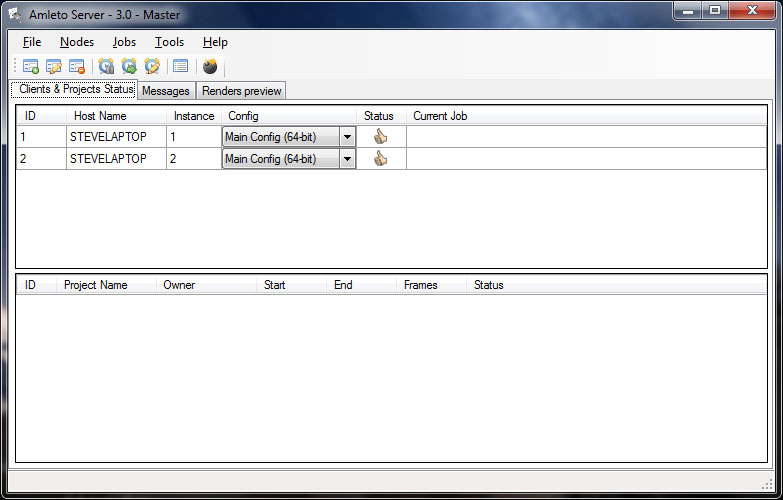
Amleto is a network rendering tool that enables to render Lightwave animations or single frames across multiple computers. It is intended to be as simple to use and setup as possible. You do not need to know much about networks, instead we use our own file transfer protocol to share files between the computers.
Easy to install and setup
No configuration needed. Just install the client software on each computer you wish to render on. The server will be automatically detected and the Lightwave files needed to be able to render will be installed on the pc for you.
Image preview
Easy preview of your images as soon as they have been rendered by the client.
Split image render
A single image can be split into segments and rendered across any clients connected to speed up the rendering of still images.
Easy to use
Easy to add new scenes and manage scenes in the render queue
Web interface
Allows you to access Amleto server from anywhere via a web browser.
Adjust Render parameters
Allows you to change the render settings of the scene without having to reload the scene in Lightwave.
Downloads
Download 3.4
Amleto 3.4 (32-bit) 2.24 MB Amleto 3.4 (64-bit) 2.45 MB
Download 3.3.9
Update history
New in version 3.4
- New thumbnail view showing frames rendered from each project
- Support for additional image formats for viewing and split rendering
- Re-added support for client and server services
New in version 3.3.9
- Updated to work with Lightwave 2015.
New in version 3.3
- Updated to work with Lightwave 11.6.1.
New in version 3.2
- Changed the way that Lightwave configs are handled. Should be easier to manage and should allow Amleto to work with new versions of Lightwave when they are released without any changes.
- Fixed some issues with file transfers to the clients.
- Plugins that have been added outside of the default Lightwave plugins folder will now be handled correctly
- Lightwave setup on the client is checked automatically on startup so any new files or plugins will be updated without having to resend the config manually.
- Render buffer support has been added.
- Finished renders are now displayed in a list and they can be re-added to the render queue if needed.
- Shows last render time for each of the client machines.
- If the server window is closed then any active jobs will be saved and re-loaded the next time it’s started
New in version 3.1.2
- Fixed problems with Split render issues
- Can now split images in a grid not just vertically
- Added support for rendering on Amazon EC2 instances. Please not that using this service for rendering can incur charges, check costs on Amazon before using
New in version 3.1.1
- Added support for Lightwave 11
New in version 3.1.0
- Render settings are now taken from the scene file and no longer changed by Amleto unless specified
- When adding a new project, the output folder will be checked and existing frames will be skipped
- Server now shows the elapsed render time and an estimated time to finish
- Several bug fixes and tweaks to the code.
New in version 3.0.9
- Added option for saving Alpha channels to the project options.
- Changed default folder for cached files, no longer in c:\temp
- Removed requirement that Amleto has to have administrator access to run.
- Changed the custom file and folder dialogs and replaced with standard OS ones